You have probably been using agentic AI for a while now, and you are likely already accumulating a lot of technical debt and chaos around it.
You adjust a skill guideline in your active repository, and everything seems to be working well. However, three other repositories in the organization have old copies of the same SKILL, and you will only find out when inconsistencies start to pile up, or you are scratching your head about the sudden degradation of output when you switch to another repo.
Or maybe another team is reinventing the wheel with MCP servers, or simply doesn't know a particular service exists and misses the chance to improve their workflows with it.
That's the price you pay when every repo keeps its own copy of the same AI agent rules. Skills, commands, MCP configs, and guidelines all drift apart, classic! And it's not only a drift problem, but it's also a "wait, this already exists?" problem. Without one shared place to look, teams can't reuse what already got built, so they will most likely build their own version.
You'll run into a lot of opinions in software engineering, but what actually matters is consistency. Pick whatever convention you want; just keep it the same everywhere. Drift is what makes future you, or whoever inherits this repo, ask "wait, what's the rule here" instead of just reasoning about the task they have in hand. Well, that was a small off-topic note.
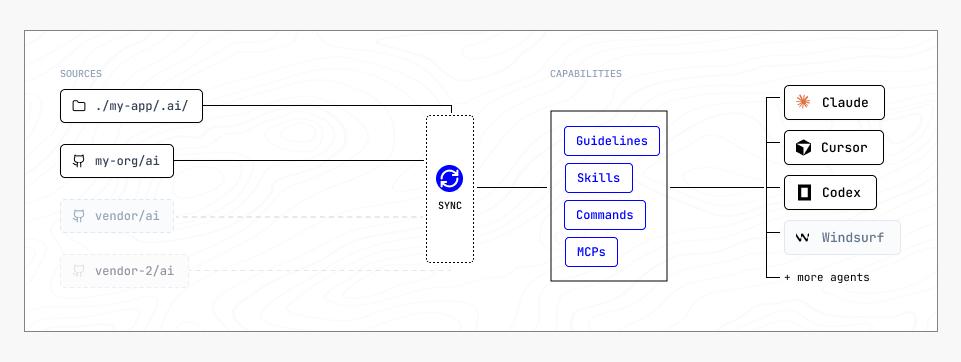
For that, I want to introduce Agenteq to you, which is a single-source CLI tool to compile repository rules, skills, commands, and MCP configurations to the developer's local AI agents. With the latest release, you can now tell a repo about any number of remote git repositories and pull their skills, commands, MCP servers, and guidelines straight into your own sync, right alongside your local stuff.
What a remote source is
A remote source is just a git repository shaped like agenteq expects GUIDELINES.md, mcp/, commands/, and skills/ sitting at its root, the same layout your project's own .ai/ already has. You register it under a unique identifier, agenteq clones it, and from that point on it's just one more input into your sync, same as your local .ai/.
Which means an org can keep one repo of shared skills and MCP servers, and every project pulls from it instead of copying it. Update the shared repo once, and the next agenteq sync in every project picks up the change.
How it combines sources
Add a remote and agenteq clones it, then hands you a picker so you choose exactly which skills, commands, and MCP servers you want, and whether you want its guidelines too. You are not forced to consume the whole catalogue provided by the shared repo. You only pick what you need in the given repository.
npx agenteq remote-source add org-standards git@github.com:acme/ai-standards.git
Managing remotes
Four commands are available to manage the remote sources:
npx agenteq remote-source add <name> <git-url>    # clone it, pick what to sync, attach it
npx agenteq remote-source list                    # list every configured remote
npx agenteq remote-source update-choices <name>   # change what you previously picked
npx agenteq remote-source remove <name>           # detach it
Migrating repos that already have scattered config
If you are reading this, most likely you are already dealing with sparse files across multiple repositories. Agenteq provides a skill to help you out already.
First, create an empty repository to collect the organization-wide skills. Then make sure all the repos you want to consolidate are checked out locally.
Then install the consolidation skill:
npx skills add https://github.com/sunchayn/agenteq --skill consolidate-repos-to-agenteq
Then invoke it via /consolidate-repos-to-agenteq.
It asks you a few questions about what you're actually trying to consolidate, then pulls the common skills, commands, and MCP servers into the new repo, rewriting anything written for one specific project into something more agnostic. Anything too specific to one repo gets left right where it is; you can always pull it in later if it turns out other repos want it too.
What is a remote source good for, and what it isn't
Good for a shared MCP server config every repo on the same stack needs/should be running, an org-wide set of code review skills, guidelines that should read the same everywhere ("write commit messages this way", "here's how we handle secrets"), and giving every team one place to actually find what MCP servers and skills already exist, instead of reinventing them.
Not a good fit for anything that needs per-repo tuning beyond what the picker offers. The picker decides which skills and commands come in, not how their content changes per repo. If a skill needs to behave differently in two repos, it belongs locally in both, not shared.
Try it
npx agenteq init
npx agenteq remote-source add <name> <git-url>
npx agenteq sync
Links:
If a remote source acts differently than what's described here, or you hit an error code that makes no sense, make sure to make an issue.